Thursday, June 20, 2013

MakeMKV vs ByteCopy vs DVDfab - Top Blu-ray Ripper/Backup Review

For a beginners, The following passages take a brief review of 3 top Blu-ray Rippers: MakeMKV, DVDfab and Pavtube ByteCopy.

Hello, the Blu-ray/DVD Backing up & Ripping Review will show you on how to lossless convert/backup hundreds of Blu-ray/DVD movies to MKV, keep exactly same video and audio quality with original disks, moreover, retain multiple audio tracks and subtitles...


Top 1. Pavtube ByteCopy Review

Pavtube ByteCopy

You might have heard Pavtube ByteCopy - It is absolutely a top choice for those who wanna put Blu-ray/DVD to HD media players like WD TV Live and NMT A-210 for playback. So what can it do for you? 

Basically, the ByteCopy is similar to MakeMKV when it cracks and copied Blu-ray Disc and DVD movie to MKV. However, this app does not only everything (selection of forced subtitles is excluded from the "everything" ) MakeMKV does, but also converts/encodes Blu-ray contents. This feature is a lifesaver for HD media players, as not a HDD player plays 100% of Blu-ray features. E.g. When a BD movie is packed into MKV, WD TV Live can not read the Blu-ray subtitles inlaid. 

At this moment ByteCopy plays an irreplaceable role- it is the exclusive Blu-ray Ripper that converts Blu-ray .sup subtitle to .sub without hurting video and audio quality. When it trans-codes and shrinks Blu-ray contents, CUDA acceleration is employed by default when possible.
  • Export file format: .mkv
  • Video: H.264/MPEG-4 AVC, VC-1, MPEG pass-through; H.264, Xvid, MPEG, VC-1 encoded
  • Audio: Dolby Digital, Dolby Digital Plus, Dolby TrueHD, DTS Digital, DTS-HD high-def, DTS-HD MA pass-through; Dolby Digital 5.1, DTS, AAC, MP3 encoded.
Read more: ByteCopy Review

Trial and Download


ByteCopy for Windows
  • Requires Windows XP, Vista, Windows 7 or Windows 8 (32bit and 64bit).
ByteCopy for Mac OS X
  • Requires x86 Mac OS X 10.5 or later.
Pavtube ByteCopy rips Blu-ray in 2 ways, lossless copy and lossy conversion. In trial version lossless backup runs 7 times only; for loss conversion, a watermark is put on the screen. A full version is offered at $42. The purchase includes a lifetime license and unlimited upgrades.
Added July 9, 2013: Pavtube ByteCopy is upgraded!It’s now a much more powerful Blu-ray/DVD ripper/converter, and BD/DVD multi track preserver. 
New features:
  1. Automatically detect Blu-ray/DVD main movie
  2. Full disc copy Blu-ray/DVD by chapters without quality loss
  3. Rip/convert/backup BD/DVD to any other format for playback on any iOS/Android/Windows tablets and phones
  4. Backup BD/DVD to MKV format with multi audio/subtitle tracks and chapter markers without any quality loss.
  5. Convert BD/DVD to MP4/MOV with multi audio (language) tracks
  6. Add SRT, ASS, and SSA subtitles to BD/DVD movie
  7. Edit BD/DVD movies: trim off commercials, crop off black bars, merge several chapters into one, split one movie into several pieces, and more
  8. Support TrueHD 6.1 and TrueHD 7.1 decoding
  9. Support latest BD and DVD (BD/DVD/Ultimate/iMedia)
Related Guide
Top 2. MakeMKV Review

MakeMKV

MakeMKV is a nice choice for those who feel like to make lossless copy of their Blu-ray and DVD collections. The software does one thing- converting the video clips from encrypted disc into a set of MKV files, preserving most information but not changing it in any way- and does it well. It is very easy to remove unwanted audio or subtitle tracks and pretty fast to back up a Blu-ray. The copying of Blu-ray Avatar took only 86 minutes. All video streams, audio tracks and subtitles are included in resulting MKV file.

Import source: Blu-ray Disc/folder/ISO, DVD

Export file format: .mkv (with original codecs)

To add- MKV (also known as Matroska) is a container file format, in which there can be many audio, video and subtitles streams, allowing the user to store a complete movie in a single file. Practically this means that it is possible to put entire movie with multiple sound and subtitle tracks, chapters and movie thumbnail into single file.

MakeMKV 1.6.8 for Windows
  • Requires Windows XP, Vista or Win7, x86 or x64.
MakeMKV 1.6.8 for Mac OS X
  • Requires x86 Mac OS X 10.5 or later.
MakeMKV 1.6.8 for Linux

MakeMKV allows for a 30-day trial, and $50 is all you pay for lifetime Blu-ray ripping feature. Its DVD ripping feature always stays free, so let's say thank you to the generous developer of MakeMKV.

Top 3. DVDfab Blu-ray Ripper Review

DVDfab

DVDfab used to stand for an excellent free DVD ripper. Now we know they can do more (and ask for more too). DVDfab Blu-ray Ripper decrypts and rips Blu-ray title to various video files playable on next generation consoles like PS3 and Xbox 360, HD player like WD TV Live, or mobile devices like iPod, iPhone, iPad, etc. Unlike MakeMKV, it exports a lot of video codecs and formats:

Video: MPEG-4, H.264, MP4, MKV, AVI, WMV, M2TS, TS etc.

Audio: MP3, MP4, M4A, WMA, WAV, AAC, AC3, DTS, etc.

So you see the differences here. With MakeMKV you get lossless Blu-ray backup but only in MKV format; while with DVDfab you lose original Blu-ray quality but get much smaller movie clips in desired format. A preferred feature of DVDfab is their "Lighting speed", i.e., multi-core CPUs and NVIDIA CUDA support. By taking advantage of CUDA accelerating, the conversion time is greatly shorted.

Trial and Download

DVDfab Blu-ray Ripper
  • Requires Windows XP, Vista, Windows 7 or Windows 8 (32bit and 64bit).
DVDfab Blu-ray Ripper for Mac
  • Requires x86 Mac OS X 10.5 or later.
Everyone can evaluate the trial for 30 days before it stops work. To continue using the software, you can buy a one-year license of DVDfab Blu-ray Ripper at $60 and $105.6 for lifetime license. If you purchase Blu-ray Ripper and DVD Ripper in bundle, it'll be $93.5 for one-year use and $154 for lifetime. Pretty high price, isn't it? Especially when you can get a similar Blu-ray Ripper at much lower price?

Compare: MakeMKV vs. DVDfab vs. Pavtube ByteCopy

MakeMKV and ByteCopy are good for lossless Blu-ray and DVD backup, while DVDfab focuses on Blu-ray trans-coding to portable devices like PS3, Xbox, etc.

Q: Which Blu-ray ripper keeps Blu-ray movie structure (including chapters)?
A: MakeMKV and ByteCopy

Q: Which Blu-ray ripper keeps multiple audio tracks and subtitles?
A: MakeMKV and ByteCopy

Q: What about the ripping speed of the three Blu-ray Rippers?
A: MakeMKV = ByteCopy (lossless copy) > DVDfab

Q: Which en-decodes Blu-ray with NVIDIA's CUDA support (GPU computing)?
A: ByteCopy and DVDfab (Tip: CUDA works only when exporting H.264 encoded videos)

Q: Which does better on Blu-ray hacking/cracking?
A: Not a Blu-ray ripper is able to crack all the Blu-ray Discs as decryption always falls behind encryption. So it's a question of upgrade and tech support. All the three updates their software along with the come up of new BD+ keys. MakeMKV and Pavtube ByteCopy charge free for updates while DVDfab asks you pay extra money for the updates.
  
If you like the tutorial, pls share it and explain the sources, thanks.

Read More:

Share 2017 Top 5 Blu-ray Rippers for Windows 10 Review For Blu-ray Fans 
2016 Top 5 Best DVD Ripper Program Review | Which One Will You Choose? (updated) 
Top 5 Best DVD Ripping Tools Review (for All Windows/Mac Users) 
2017 Top 5 Alternatives to MakeMKV 
Top 2 Best Lossless Blu-ray to MKV Converter Review: ByteCopy & MakeMKV


Tuesday, June 18, 2013

Quick convert DVD Movies to Galaxy Tab 3 and remain great video quality

"My family is going on a trip and I want to convert some DVD movies for our new Galaxy Tab 3. I tried some DVD Rippers and they surely extracted great videos, but it takes quite a long time to finish conversion. I expect one converter can do quick conversion while remain great video quality."

Did you get any video card like Nvidia or ATI equipped to PC? If so, Pavtube Video Converter Ultimate applications now take full advantage of the NVIDIA CUDA technology and AMD ® Accelerated Parallel Processing (APP) to largely accelerate video encoding speed. The GPU acceleration saves users time when transcoding/converting/ripping video files from one format to another by using H.264 codec. With a PC running on a CUDA-enabled Graphics card, or an AMD graphics card with AMD APP technology, the conversion speed of Pavtube software is about 6X faster than before.


Meanwhile, Pavtube Video Converter Ultimate is the best all-in-one application that combines a best Blu-ray Ripper, DVD Ripper and Video Converter, it guides you to rip and convert Blu-ray/DVD movies and almost all kinds of videos to universal video and audio file types with super fast conversion speed and excellent image and sound quality. The updated Pavtube Video Converter Ultimate works better on converting regular videos without video/audio sync issues.
  
Let's get deeper: How to get this program work and how to convert DVD for portable devices, e.g. Samsung Galaxy Tab 3, Galaxy Tab 2, Galaxy S4, S3, Galaxy Note II, etc.

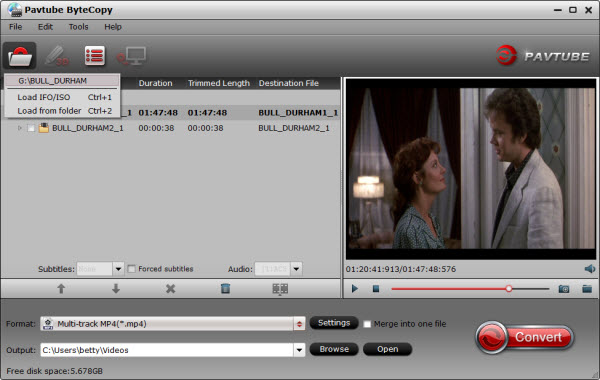
Step 1: Free download the Pavtube Galaxy Tab 3 Video Converter Ultimate, install and launch it.

Click "Load from disc", "Load from folder" or "Load IFO/ISO" icon to load DVD movie.


DVD Movies to Galaxy Tab 3

Step 2: Select "Samsung Galaxy Tab 3 Video(*.mp4)" as output format.

Click the dropdown list of "Format" and you can find alt least one profile for your device and we recommend you to choose "Samsung > Samsung Galaxy Tab 3 Video(*.mp4)" as output format for transferring DVD to Galaxy Tab 3


Tips: If you cannot find that particular profile preset for your own device, don't worry, Pavtube Video Converter Ultimate offers several common profiles for Android tablets/phones as well as Windows 8 tablets/phones or iOS devices, etc.

Step 3: Customize profile settings (optional)

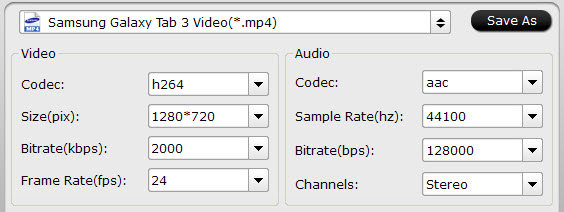
Click "Settings" button next to Profile box to change output profile parameters like video codec, audio codec, video size, bit rate, framerate, etc.


Step 4: Start conversion.

On the main interface, click the "Convert" button to begin to convert DVD movies to Galaxy Tab 3 optimized formatwithout video/audio sync issues.

After successful conversion, click "Open" button on program main UI, locate the converted videos and transfer video files from PC to Samsung Galaxy Tab with Kies.

Read More:

Saturday, June 15, 2013

Beautiful Father's Day Wallpaper 2013 from Pavtube Facebook

Happy Father's Day 2013! 

Father's Day Wallpapers are Quite useful for us in order to decorate the desktop, laptop Screen, tablet and smartphone with the beautiful Father's Day Wallpapers. I'm posted the several Unique desktop Wallpapers for Fathers day. Hope It will be useful for you to decorate the screen on this Father's Day 2013.


If you like, please share, thank you.

The beautiful Father's Day Wallpaper from Pavtube Facebook: https://www.facebook.com/media/set/?set=a.572184886159285.1073741824.154234434621001&type=1

Friday, June 14, 2013

The wait is nearly over Apple unveils new Mac Pro


"Can't innovate any more, my ass."

Apple senior vice president Phil Schiller's in-your-face statement essentially sums up what Apple thinks of the new Mac Pro, unveiled during a "sneak peek" at the Worldwide Developers Conference on Monday. Apple's new desktop workstation isn't just a powerful machine for the most demanding users, it shows that the company still takes the Mac and its product design seriously.

Apple's new desktop workstation features a sleek, cylindrical design that's a stark contrast to the mammoth, roomy aluminum tower initially introduced with the Power PC-based Power Mac G5 in 2003, and revised with the release of the Intel-based Mac Pro in 2006. Apple didn't announce a formal ship date, stating that the new Mac Pro will ship later this year, nor did it talk about pricing or specific models. It will be made in the United States.

 
"You're going to love the Mac Pro. It's killer," said Apple CEO TIm Cook about the new Mac Pro.

What the new Mac Pro has

The new 9.9-inch tall Mac Pro case is about one-eighth the size of the Mac Pro tower. The entire top of the Mac Pro is a handle for carrying, and motion sensor lights show the I/O ports. The new design, according to Schiller, is based around a "unified thermal core" to help keep the machine cool.

Apple didn't just rely on the stunning, jaw-dropping design of the new Mac Pro for its sneak peek. Schiller offered a lot of specifics as to what's under the hood.

At the heart of the Mac Pro is a Xeon E5 processor, which is based on Intel's Ivy Bridge microarchitecture and introduced by the company last April. Configurations with 12-cores will be available, and all Mac Pros will use third-generation PCI Express architecture. Apple is also using 1866MHz ECC DDR3 RAM.

Schiller also went to great lengths to emphasize the new Mac Pro's graphics performance. The machine will have dual AMD FirePro workstation-class GPUs, and be able to run three 4K displays at one time. Apple says the new Mac Pro's graphics performance is 2.5 times faster than its predecessor.

The Mac Pro is designed for speed, and Apple is outfitting the machine with PCIe-based flash memory, not traditional SATA hard drives or solid-state drives. Apple touts speeds of 1.25 GBps for reads and 1.0 GBps for writes. The company did not give specifics as to the amount of storage available.

 
The new Mac Pro's ports: audio out, headphone jack, four USB 3 ports, six Thunderbolt 2 ports, two gigabit ethernet ports, HDMI out, power.

What the Mac Pro is missing

The new MacPro will have Thunderbolt 2, the newest iteration of Intel's Thunderbolt technology that supports data rates of 20 gbps. Thunderbolt 2 will be a critical technology for new Mac Pro users—it will provide connectivity for legacy devices.

The most remarkable change with the Mac Pro is the elimination of expansion slots. The previous Mac Pro had a pair of 16-lane PCI Express 2.0 slots and a pair of 4-lane PCI Express 2.0 slots. For current owners who have filled their Mac Pro's slots and still need to use their cards, you'll have to invest in an external Thunderbolt expansion chassis that will house expansion cards and connect to the new Mac Pro via Thunderbolt.

 
The new Mac Pro is much smaller than the previous Mac Pro.

During the new Mac Pro presentation, there was no visual evidence of an optical drive. With the elimination of the optical drive from the Mac mini, iMac, MacBook Air, and Retina MacBook Pro, it's not a surprise to see the optical drive dropped from the new Mac Pro. (The standard MacBook Pro is the only Mac with a built-in optical drive.) As with expansion cards, current Mac Pro owners who have and need optical drives must turn to external USB solutions, either by buying new external optical drives or by removing the optical drives in their current Mac Pro and housing the drives in an external USB case.

Each Thunderbolt 2 port supports up to six daisy-shained devices. With six Thunderbolt 2 ports, the Mac Pro can support up to 36 Thunderbolt peripherals.

Updated 6/10/13 at 12:30 p.m. PT with product photos and to correct the processor type. Updated at 12:45 p.m. PT with more product details. Updated at 4 p.m. PT to correct the Xeon E5's processor family.

Thursday, June 13, 2013

Lossless Backup Blu-ray/DVD to MKV file for playback on PC and HD Media Players


"Hey guys im looking at backing up my bluray collection and was wondering what the best way to do this is. I realize there are going to be huge files but I want them as mkv for media browser and so the kids dont destroy my discs lol.
 
my media center should handle the conversion seeming it's a core i7, 8gb ram, 1.5tb hdd and bluray burner. So any help would be greatly appreciated."
  
Since I have been dealing with backing up both my Blurays and HD DVDs (yes, I have some of these) to hard disk recently, I stumbled across a pretty darn awesome program called Pavtube ByteCopy.

What makes MakeMKV so special is that is unique. It is essentially a decrypter and remuxer packaged into one. It decrypts Blu-rays, HD DVDs, and DVDs. You can use Pavtube ByteCopy to backing up commercial Blu-ray and DVD movies to MKV container format with multiple audio tracks and subtitles included for playback on PC and HD media players. Besides retaining multiple audio tracks (especially HD audios - Dolby TrueHD, DTS-HD Master Audio) and multiple subtitles in an MKV video without transcoding, Pavtube ByteCopy is also able to encode the original soundtracks into DTS 5.1 channels, AC3 5.1 channels, AAC 6 channels, PCM 6 channels, and MP3 6 channels with your wanted languages.


Movie lovers that would like to make 1:1 backup of Blu-ray Discs may download a trial of Pavtube ByteCopy software and follow the tutorial to create flawless digital copy your BD/DVD.

Software Availability

System Requirements
  • Processor: Intel or AMD Dual core CPU, 1.6 MHz at least
  • Operating System: Windows 2003/XP/Vista/Windows 7/Windows 8
  • Memory: 512MB or above
  • Display resolution: 1024 x 768 or above
  • Optical Drive: DVD drive/ BD drive(BD drive is required for ripping Blu-ray disc)
         
To save your time and efforts, lossless Blu-ray/DVD to MKV backup is shorted into a 3-step process.

Step 1. Click Load Disc button to import movie files from DVD/ Blu-ray Disc.


Step 2. Click the Edit Disc button to select desired subtitles and audio tracks for all chapters. The software keeps all subtitles and audio streams by default. Choose "Lossless" in dropdown list of "Format" box if you'd like to backup Blu-ray video stream without quality losss. 

Step 3. Click the "Convert" button to start lossless backing up Blu-ray and DVD movie to MKV files.

In this way Pavtube ByteCopy extracts the main movie with selected subtitles and audio tracks from disc and seals the contents into MKV container without transcoding, which means you get lossless quality MKV videos. 

Some helpful tips for first-time users:

Learn More Useful Tips:

1. By default the video size is "original". When you make changes to video size, please also check the "Encode" box below "All Subtitle Stream". When a subtitle looks fine on 1920*1080 video, it might go beyond the screen when the video is resized to 1280*720, so make sure the subtitle is converted as well. 

2. Do not set 6 channels for audio when MP3 or MP2 codec is selected. Do not set 1 channel when DTS is set as audio codec. 

3. A lossless Blu-ray movie can take up space ranges from 20GB to 50GB. If you want to cut down file size, try setting smaller value in video "Bitrate" instead of using "original". 
  • 18000kpbs- excellent HD video quality 
  • 8000kbps- DVD video quality 
  • 2000kbps- video for portable media players (e.g. Galaxy Tab, Archos 101) 
  • 512kbps- video for regular mobile phones 

4. When H.264 is set for encoding video streams, you may take advantage of CUDA encoding. Follow "Tools -> Preference -> Others" to set CUDA encoder

5. In order to play a video clip properly on your device, make sure the video is encoded with proper codec (ByteCopy offers H.264, Xvid, MPEG-2 only) and packed in proper container format (MKV only for ByteCopy) with proper bitrate, frame rate, resolution, audio channels.

Added July 9, 2013

Pavtube ByteCopy is upgraded!

It’s now a much more powerful Blu-ray/DVD ripper/converter, and BD/DVD multi track preserver.

New features:
  1. Automatically detect Blu-ray/DVD main movie
  2. Full disc copy Blu-ray/DVD by chapters without quality loss
  3. Rip/convert/backup BD/DVD to any other format for playback on any iOS/Android/Windows tablets and phones
  4. Backup BD/DVD to MKV format with multi audio/subtitle tracks and chapter markers without any quality loss.
  5. Convert BD/DVD to MP4/MOV with multi audio (language) tracks
  6. Add SRT, ASS, and SSA subtitles to BD/DVD movie
  7. Edit BD/DVD movies: trim off commercials, crop off black bars, merge several chapters into one, split one movie into several pieces, and more
  8. Support TrueHD 6.1 and TrueHD 7.1 decoding
  9. Support latest BD and DVD (BD/DVD/Ultimate/iMedia)


It’s upgrade, but still $42 and free to try. 

Read More:
          

Thursday, June 6, 2013

2013 Father's Day Gift Guide - Get 20% OFF Best Video Converter Ultimate for Android/iOS devices

Not far from Mother's Day, Father's Day is coming soon. People usually celebrate Father's day on the third Sunday of every June for fatherhood, paternal bonds and great influence of fathers in society. What do you prepare for this special occasion, flowers, dinners, or tech gifts? Too ordinary, don't you think? How about something our fathers are looking forward to and would actually use in daily life like software tool?


To celebrate Father's Day with you, Pavtube Studio launch a huge Coupon Code as the 2013 Father's Day Special Gifts. Up to 30% off for your beloved dad! Backup/convert BD/DVD/Videos for home server, iPhone/iPad/Android/Windows 8 Tablets & Phones, various Video Editing Software(FCP, iMovie, FCE, Avid, Premiere, Sony Vegas, Windows Movie Maker, etc.)

  1. 30% OFF Blu-ray Ripper (Windows/Mac)  -  Save $15
  2. 30% OFF DVD Ripper (Windows/Mac)  -  Save $10.5
  3. 20% Video Converter Ultimate  -  Save $13
  4. 20% iMedia Converter for Mac  -  Save $13

In below contents I recommend several simple and easy softwares as gifts for Father's Day.

1. Best BDMagic software as Father's Day Gift 2013

Pavtube (3D) BDMagic which is considered as professional Blu-ray and DVD movie ripping program is capable of ripping 3D Blu-ray discs, 2D Blu-ray Discs and standard DVDs to required video formats including MPEG-4/H.264 MP4, MPEG, RM, QuickTime MOV, MPG, Xvid, Divx, 3GP, FLV, VOB, ASF, SWF, DV, MP3, AC3, AAC, OGG, FLAC, etc, so that you can play the generated BD\DVD movies on media players like Apple TV 3rd Generation, WD TV Media Player and PS3, and portable devices, such as iPad 3, Galaxy Tab 3, Samsung Galaxy S III, Google Nexus 10, Nexus 7, and video editing programs including Window Movie Maker, Sony Vegas, Adobe Premiere Pro, Avid, Pinnacle Studio.

Pavtube (3D) Blu-ray Ripper is a perfect Blu-ray copy software tool which supports full disc copy (1:1) to the hard drive of your PC with Blu-ray and DVD's original structures without any quality loss. Plus, taking advantage of the NVIDIA CUDA technology and AMD APP technology, the conversion speed can be increased up to 6 times faster than ever before.
2. Best DVDAid software as Father's Day Gift 2013

Playing DVD movies on DVD player at home has never been a problem for you. The question is, what if you'd like to enjoy your favorite DVD movies when on the road? Bringing several discs along tend to be inconvenient, not to mention they jump on the most crucial scenes and are prone to scratches. Now that Android-based devices have rocked into the mainstream, there's an easy way taking DVD movies alongside, i.e., ripping DVD and putting movies onto your Android tablet/phone or iPad, iPhone and Windows 8 devices, etc.

Pavtube DVDAid is the best DVD ripping software that provides movie lovers with the easiest way to rip and convert DVD movies to MP4/AVI/MKV/WMV and many other video and audio formats with high quality. It works as a powerful DVD to tablet/smartphone/HD media player converter which enables you to enjoy DVD movie on your portable devices and HD Media Players

Taking advantage of the NVIDIA CUDA and ATI Stream acceleration technologies, the conversion speed is increased up to 6 times faster than ever before.

3. Wonderful all-in-one Video Converter Ultimate program as best Father's Day Gift 2013

Pavtube Video Converter Ultimate integrates a best Blu-ray Ripper, a DVD Ripper, and a Video Converter together for your father to backup and rip Blu-ray/DVD, ISO/IFO movies and convert various video and audio files to device optimized formats with super fast conversion speed and excellent image and sound quality.

An all-in-one solution to fast convert Blu-ray/DVD and various videos to MKV/AVI/H.264…
Stream media contents from your PC to Android, Windows and iOS devices over wireless network.
Backup Blu-ray 3D movies to 3D/2D video files like MP4, AVI, MKV, MOV, WMV, etc.
Convert Video/DVD/Blu-ray to the new iPad 3, Apple TV 3, Xoom. Galaxy Tab, HTC One X, Asus Transformer Pad TF300, Galaxy Note 10.1... with pleasant quality.
Support NVIDIA CUDA and ATI Stream (AMD APP) acceleration technologies.
Convert Blu-ray and DVD movies with your specified audio/subs tracks.
4. Best iMedia Converter for Mac as Father's Day Gift 2013

Pavtube iMedia Converter for Mac is an all-in-one Blu-ray Converter for Mac, Mac DVD Converter, and Video Converter for Mac. It helps you convert videos, non-protected Blu-ray and DVD movies to a wide variety of devices for well playback, including iPad/iPad 2, the new iPad, iPad mini, iPad 4, Galaxy Tab 10.1, Kindle Fire HD 7/8.9, Microsoft Surface RT/Pro, Toshiba Thrive, Dell Streak, Archos 101/70/7/5 , Apple TV/Apple TV 2/Apple TV 3, iTouch 4, Nokia N9, Droid X, Motorola Atrix 4G, PS3, Xbox 360, etc.

The iMedia Converter for Mac can convert 1080p/720p camera/camcorder footage(.MXF, .MTS, .MOV, .AVI...)to editable files for using in non-linear editing apps like iMovie, Final Cut Express, Final Cut Pro (X), Avid Media Composer, Adobe Premiere Pro and more. The HD footage can be compressed to SD video clips for storage when you wanna save storage space. The Mac iMedia Converter is also able to extract audios from Blu-rays, DVDs and various videos for media players with high quality and fast conversion speed.


5. Great Android Video Converter as Father's Day Gift 2013

Pavtube Video Converter supports multiple video files from camera video footage, TiVo recordings, and regular videos like MKV, TS, TOD, MOD, FLV, F4V, AVI, QuickTime MOV, VOB, MP4, MPG, MPEG, ASF, MVI, VP6, EVO, VRO, DV, MP3, AC3, MKA, WMA, WAV, M4A, OGG, APE and more as source files to output another format you expect for media player and portable devices playing and video editing program editing.

Other user-friendly and effective products for Father's Day 2013

Pavtube brings many other programs for our fathers to entertain their spare time, like Pavtube DVD Creator for burning Blu-ray/DVD movies and video clips onto a blank DVD, Pavtube ByteCopy for backing up Blu-ray and DVD movies to MKV with lossless quality and full preservation of all audio tracks, subtitles and chapter markers, etc.,Pavtube ChewTune for converting iTunes videos/Digital Copies/Amazon movies/BBC iPlayer videos to Android/iOS/Windows 8 Tablets or Phones, etc.

Like us on this page to get it Now! Expires on June 23, 2013. Don't forget to tell your friends about it!:)

https://www.facebook.com/pavtubefans?v=app_198826126804423

2013 Father's Day Gift - 5 Best Tech Gifts for Your Beloved Dad

Added: July 9, 2013
Up to 50% Off Summer Holiday Sale 2013 Starts: Rip/backup/convert your BD/DVD/Videos for iOS/Android/Windows Tablets/Phones with much lower price now!
  • Free DVD Ripper (Windows/Mac)  is coming soon
  • Free Video DVD Converter Ultimate is coming soon
  • 30% OFF Blu-ray Ripper (Windows/Mac)  -  Save $15
  • 50% OFF DVD Creator (Windows/Mac) - Save $17.5
  • 50% OFF Media Magician (Windows/Mac) - Save $22
  • 20% Video Converter Ultimate  -  Save $13
  • 20% iMedia Converter for Mac  -  Save $13
Like us on this page to get it Now! Expires on July 31, 2013 . Don't forget to tell your friends  about it!:)  
http://www.pavtube.com/2013-summer-sale.html


Added: June 6, 2013

Father's Day is just around the corner (mark your calendar: June 16th). With Father's Day approaching, it is a great time to buy something special for dad, like a new bottle of his favorite cologne or one new Nautica grosgrain watch. But if your father has a taste for the latest and greatest technology, what should you surprise him with? Here we have tried to list out some Father's day best tech gifts for dad 2013. Just read on to get started.


Tablets: iPad 3, iPad Mini, Galaxy Tab 3 or Nexus 10

Get one tablet for your father is also a good idea on father's day. So why not get the best tablet? Yes, the iPad, iPad Mini and Samsung Galaxy Tab 3, Google Nexus 10, Nexus 7 or Microsoft Surface Pro etc. Sure it's great for all those stereotypical dad things - watching sports through the ESPN app, playing high-resolution, 3D games - but it's also just a great reading companion and perfect for skimming emails before bed.


However, there are other really good options. I have list you the Best Android Tablets in The World and 2013 Top 5 Cheapest Android Tablets in India.

Smartphones: Samsung Galaxy S4, iPhone 5, Sony Xperia Z, BlackBerry 10 or HTC One

Okay, now is the best time to get a new smartphone due to Samsung and HTC both released its flagship smartphone several months ago, the Galaxy S4 and HTC One. Both of these two devices are power with strong processor, powerful camera and own a lot of new features. The Samsung galaxy s4 is the most powerful android phone, HTC one is the best HTC android phone, you can also choose iPhone 5, Sony Xperia Z, BlackBerry 10. Google Nexus 4, Galax S3 and so on, so in my eyes it is the perfect time to get one for your father if your dad has been hinting at for weeks.


Want to see the more phone details, just check Best smartphones of 2013.

Camera: Sony PMW-F55

The Sony PMW-F55 a next-generation CineAlta 4K digital cinema camera, featurs high-data-rate on-board recording of XAVC 4K and 180 fps XAVC 2K/HD with a free planned upgrade. With its revolutionary electronic global shutter and outstanding professional features, it has won lots of fans and owners. 


If you want to edit Sony F55 shooting for sharing, playing or managing, etc., just check:

Streaming Media Player: Roku 3


A Roku 3 box is the easiest way to bring broadband television directly into any living room, provided there's an HDTV and a fast Internet connection. Think lightning-quick searches across Netflix, Hulu Plus, Amazon Instant Video, plus hundreds more. And plugging headphones directly into the remote means he can watch without waking anyone.

Headphones: Bose QuietComfort 15 headphones, Beats by Dre Executive

Yes, they're on the pricey side at $299, but we haven't met a dad who wouldn't mind getting a pair of these headphones as a gift. Thanks to its extracomfortable design, improved sound, highly effective noise-canceling circuitry, device folds for compact storage in included carrying case, the Bose QuietComfort 15s currently offer the best sound and silencing capabilities in a pair of noise-canceling headphones.

And everyone knows Beats Executive™ headphones are designed to take you from boardroom to the tarmac and everywhere in between. These over-ear headphones deliver the legendary Beats sound in a refined premium package that's easier than ever to take on the road.


For cheap headphones, the Panasonic RP-HTX7 Monitor Stereo Headphones is a really good option which only cost you around $50.

Want to get more gifts for your beloved Dad? Click https://www.facebook.com/pavtubefans?v=app_198826126804423

So just show your love to your dad with these Best Father's Day Tech Gifts on this Father's Day 2013.