May 23, 2013, Pavtube Blu-ray Ripper is updated to MKB V38, with more powerful features and most favorable 40% off discount at Pavtube Facebook. The discount will be expired on May 30, 2013. With the new update, this Blu-ray and DVD Backup tool is able to rip latest Blu-rays and DVDs with perfect audio-video synchronization and more output formats for all latest Android/iOS/Window Tablets and Smart Phones.
What can Blu-ray Ripper do for you?
Pavtube Blu-ray Ripper is a useful Blu-ray and DVD ripping / backup / converting tool for you to backup your favorite Blu-ray or DVD movies or make your BD or DVD movies playable on Apple TV, iPad, All SmartPhone and Tablets, HD Media Player, or other media devices. You can full disc copy the Blu-ray or DVD if you only want to make a backup in case your discs being scratched or broken some day. It's user-friendly with thoughtful features helping users to choose output format with one click; select the right language, subtitle, or forced subtitle to output; trim off unwanted movie beginning, ending, or advertisements; crop off black bars (letter box) to make the movie look better; merge or split movies to get exactly the length you want, and more.
What's new in the latest 4.3.0.4818 version?
Supports latest Blu-ray and DVD
The latest keys are updated to MKB V38. It now supports almost all latest Blu-rays and DVDs on market, like:
Better audio-video synchronization
The AV-Sync technology has been improved greatly. You will find it much better than its competitors.
Better DVD main title detecting
It's more powerful on auto detecting DVD main titles. Once you want to rip a DVD, just import and rip.
More output formats for latest Mobile Devices
It adds more preset output formats for latest Mobile Devices like iPad 4, Samsung Galaxy Tab 3, Google Nexus 10, etc. If you can't find the right format for your device, you can now select common presets like Android Tablets 720P Video (*.mp4), Android Tablets 1080P Video (*.mp4), Android Phones 720P Video (*.mp4), Android Phones 1080P Video (*.mp4), or Windows 8 Tablets H.264 Video (*.mp4).
Enhanced CUDA acceleration
The CUDA graphic card acceleration feature is much improved and you can convert it faster than before especially when you are encoding H.264.
More bug fixing to make the program more steady and trustful.
Test the free trial version and you will find it's much more than what I told you. You will find it the best, cheapest, and easiest Blu-ray and DVD backup tool, converter, ripper, and editing tool.
Summary: Many people have large Digital Copy movies and would like to make a dvd collection for sharing with friends; but the DRM protection will make this a not likely achievement. Now with our DRM remover and Free Pavtube Mac DVD Burner, you can burn digital copy to dvd easily and efficiently.
You may have a large
Digital Copy movies with some popular TV shows and movies, and would like to burn them to DVD to playback with regular DVD player. However you may get stuck with the DRM protection on the videos; Now with the help of DRM remover for mac and free DVD burner for mac, you can achieve your goal easily and fast.
To burn digital copy to DVD, there are two steps you need to go through: first, remove DRM protection from Digital Copy; second, burn DRM-free Digital Copy movie to DVD.
To finish the first task, you will need a powerful DRM remover for mac which is capable of breaking protection on iTunes videos, pavtube ChewTune for Mac is the one you need.
You can click here to download Pavtube ChewTune for Mac trial version; there's also a version for Windows users.
To burn the converted videos to DVD, you can click here to download the free DVD Creator for Mac.
Now install them and follow the steps below to burn digital copy to DVD effectively.
Part 1: How to remove Digital Copy DRM on Mac
1. Run the Mac DRM remover - ChewTune for Mac and click "Add files" for individual videos, or "Add from folder" to load the entire folder; the drag-and-drop is also supported.
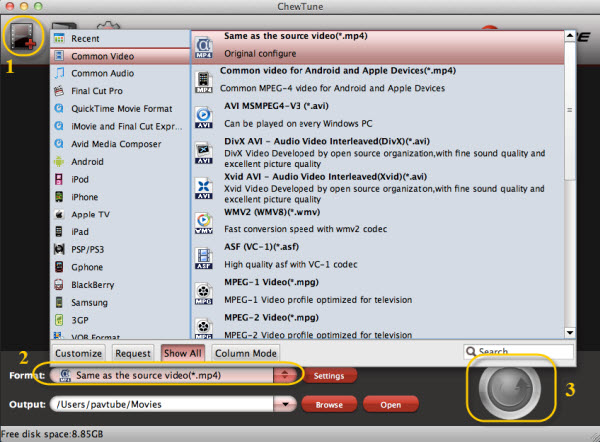 2. Select output format and destination folder.
Click Output Format and select the format you want from the drop-down list. And by clicking Output Folder at the bottom, you can browse your computer for a better destination folder to output your converted Digital Copy movies. To convert your videos to be burn into DVD, we suggest you choose the Common videos - MP4 as below.
3. Converting Digital copy movies.
Now just click the "Convert" button to begin the conversion process. Once the conversion completes, find your finished files by clicking the Open Folder button at the bottom of the panel.
Part 2. How to burn converted digital copy movies to DVD on Mac
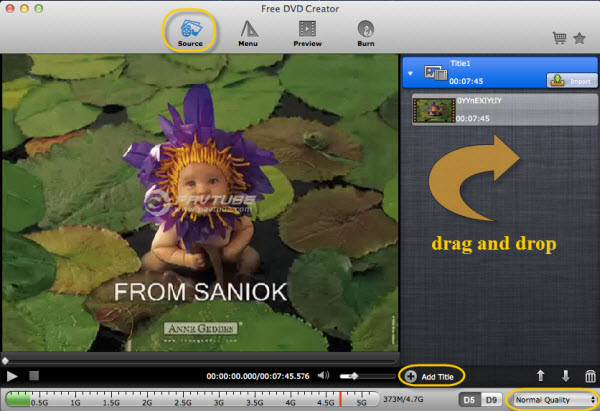
1. Add files
Run Free Digital Copy to DVD Burner. Drag and drop your videos to the right like this
2. Select output format and destination folder.
Click Output Format and select the format you want from the drop-down list. And by clicking Output Folder at the bottom, you can browse your computer for a better destination folder to output your converted Digital Copy movies. To convert your videos to be burn into DVD, we suggest you choose the Common videos - MP4 as below.
3. Converting Digital copy movies.
Now just click the "Convert" button to begin the conversion process. Once the conversion completes, find your finished files by clicking the Open Folder button at the bottom of the panel.
Part 2. How to burn converted digital copy movies to DVD on Mac
1. Add files
Run Free Digital Copy to DVD Burner. Drag and drop your videos to the right like this
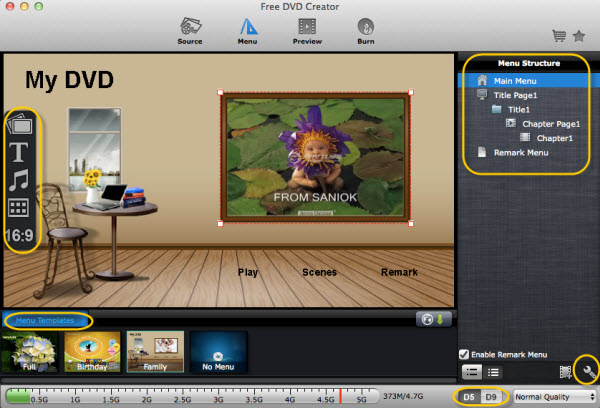
 2. Set parameters and start burning.
You can choose from several custom themed DVD menu templates, import audio files for background music and add your own image file to be the menu background. Next you'll be able to adjust the technical of your DVD. Also adjust video quality, dvd type and more. After that, just click the Burn button and burn Digital Copy to DVD, and bingo! Now you can play them on your regular DVD player with ease.
2. Set parameters and start burning.
You can choose from several custom themed DVD menu templates, import audio files for background music and add your own image file to be the menu background. Next you'll be able to adjust the technical of your DVD. Also adjust video quality, dvd type and more. After that, just click the Burn button and burn Digital Copy to DVD, and bingo! Now you can play them on your regular DVD player with ease.
 PS: For more info of Free Pavtube DVD Creator for Mac, pls refer to here:
Tips & Warnings
Many mainstream digital media management programs (such as iTunes) are not designed to let you burn digital videos to DVD that will play on a standalone DVD player. The reason for this is because those companies do not wish to enable copyright infringement. Therefore using DVD burning software it is your responsibility to respect all applicable copyright laws.
PS: For more info of Free Pavtube DVD Creator for Mac, pls refer to here:
Tips & Warnings
Many mainstream digital media management programs (such as iTunes) are not designed to let you burn digital videos to DVD that will play on a standalone DVD player. The reason for this is because those companies do not wish to enable copyright infringement. Therefore using DVD burning software it is your responsibility to respect all applicable copyright laws.
Read More:
We of SamMobile would like to give you the latest I9300XXUFME3 – Android 4.2.2 Jelly Bean test firmware for the Galaxy S III. Big Thanks to our insider who made this all possible.Development on Android 4.2.2 update isn't completely done yet. We do not know if Samsung will bring the new Galaxy S4 Camera features to the Galaxy S3. We expect Samsung to do this but we are not really sure if Samsung will do this with Android 4.2.2 or with 4.3 for the Galaxy S3.Android 4.2.2 is still under testing phase by Samsung and they will release the official final Android 4.2.2 Jelly Bean update for the Galaxy S III in June. We wanted to give Samsung's hardcore fans a sneak preview of what Samsung is up to at their dev center.
You will also find a lot more screenshots in the link below.
Galaxy S3 on Android 4.2.2
New enhancements in Android 4.2.2 update
- Android 4.2.2 – Build ID: JDQ39
- New S4 Lockscreen: Multiple Widgets, two Unlock effects (Ripple and Light), improved ripple effect than Android 4.1.2, ability to change clock size and set a personal message
- New Screen modes (From S4): Adapt Display and Professional Photo
- Daydream
- Driving mode
- Actionable notifications
- New Additions in Notification Center
- Completely revamped Settings UI (Tabbed interface – Exactly like the S4)
- Addition of Voice controls (Let’s you control various parts of the phone using voice commands – Galaxy S4 feature)
- Gallery modes have white background (When changing gallery modes to 3D the background changes to white)
- Full screen Samsung apps
- New S-Voice (from S4)
- New smart switch widget
- Found more? Tell us about them in the comments below!
WARNINGS
- This firmware will increase your binary counter but the current binary and system status will remain official.
- We have re-packaged this firmware from dump files.
- There is no modem in this firmware, so the Modem you will be using before flashing this firmware will remain the same.
- This is a pre-release firmware and not official from Samsung.
- We have fully tested this firmware and this firmware works perfectly as any other official firmware.
Firmware Details
- Android Version: 4.2.2 – JDQ39 (Jelly Bean)
- PDA: I9300XXUFME3
- CSC: I9300OJKFME1
- MODEM: N/A
- Region: Middle East
- Carrier: Branded
- Changelist: 611730
- Build Date: 8 May 2013
- Download: I9300XXUFME3_I9300OJKFME1_ILO.zip
Flashing Instructions
- Unzip the file
- Open Odin 3.04 (already included in the firmware package)
- Restart phone in download mode (Press and hold Home + Power + Volume down buttons)
- Connect phone and wait until you get a blue sign in Odin
- Add I9300XXUFME3_I9300OJKFME1_HOME.tar.md5 to PDA
- Make sure re-partition is NOT ticked
- Start flash, sit back and wait a few minutes.
- If you encounter any issues with the firmware (Any FC, Bootloop etc)
- Boot into recovery mode (Home+power+vol up)
- Choose to wipe/factory reset. (THIS WILL ERASE ALL OF YOUR DATA INCLUDING YOUR INTERNAL SD CARD!)
- Then choose reboot and you should be good to go!
Source: Sammobile
Speculation has emerged that Samsung is looking to switch to Intel as a processor supplier for its forthcoming flagship Galaxy Tab 3 10.1 10-inch tablets.
Currently, Samsung uses an ARM-based (Cortex A9) Texas Instruments processor to power its current generation Galaxy Tab 10.1 tablets.
However, according to Android Authority, a new device with the serial number “GT-P5210” with “Samsung” listed as the brand has been spotted in the records of graphics chip benchmarking site GFXBench.
The Android 4.2.2 device is listed as using an Intel Atom Clover Trail processor and having an “x86” processor type.
While the discovery has prompted speculation Samsung could be looking at switching its processor architecture, the news also comes less than a week after KGI Securities analyst Mingchi Kuo predicted an Android laptop using an Intel Atom processor could hit the market within three to four months.
Earlier this month, SmartCompany reported Intel's executive vice president and chief product officer Dadi Perlmutter revealed the microprocessor giant was working with a number of hardware manufacturers on Android laptops, which would have a low-end price point of $US200.
"We have a good technology that enables a very cost-effective price point," Perlmutter said.
"[The price of Windows 8 laptops] depends on how Microsoft prices Windows 8. It may be a slightly higher price point."
The news comes at a tough time for Intel, which has seen its traditional PC chip market erode since the release of Windows 8, with worldwide PC sales taking a 13.9% hit during the first quarter of 2013 according to recent IDC figures.
The release of Windows 8 has led to a dramatic 13.9% year-on-year slump in first quarter PC sales, according to recent figures.
The tutorial will tell you how to convert any videos and movies to Samsung Galaxy Tab 3 support video formats on Windows or Mac.
Samsung Galaxy Tab 3 adopts the "Samsung look" – all plastic with a single physical home key encircled by a menu and back button (on-screen buttons are gone), and the rear camera is positioned centrally. But look at the spec sheet, and you won't notice an inch of a difference. The Galaxy Tab 3 has a 7-inch 1024 x 600 pixel display, a 1.2GHz dual-core processor, 1GB of RAM and 8GB or 16GB of internal storage. It's also got a 3-megapixel rear and 1.3-megapixel front cameras. Yes, that is exactly the same configuration last year's Galaxy Tab 2 had. After carefully comparing the spec sheets, we did notice a single difference - the Galaxy Tab 3 is lighter with a weight of 0.66 pounds (302 g) compared to the 0.75lb (344 g) on the second-gen tablet. It's also got narrower bezel, saving you a total of 0.44 inches (1.13cm) on the Y axis.
And this Samsung Galaxy Tab 3 is also a great media player which supports a lot of media formats including files withMP4, DivX, Xvid, H.264, H.263, WMV as video format and MP3, WAV, eAAC+, WMA, AC3, Flac as audio format. Now if you have already had lots of MKV, VOB, MPG, Tivo shows, WebM, FLV and F4V videos or movies, you can use Galaxy Tab 3 Video Converter to convert your 1080p/720p HD videos and movies collections to Samsung Galaxy Tab 3 support formats, then you can take it everywhere for playing.
Step-by-step: How to Convert MKV, VOB, Tivo, MPG, WMV, WebM, FLV and F4V to Galaxy Tab 3 supported format?
Step 1: Free download Best Video Converter for Galaxy Tab 3, install and launch it.
Click "Add Video" to load video source. The Best Galaxy Tab 3 Video Converter supports video formats and codec like H.264, MPEG-4, MPEG-2, TS, WMV, MKV, MOV, TOD, M2TS, MTS, VOB, TiVo, FLV, F4V and more other codecs.
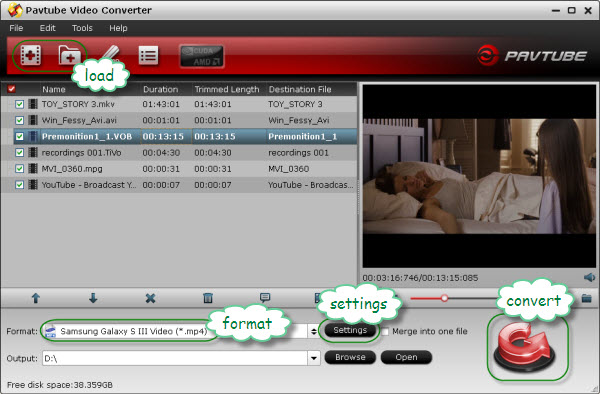 Step 2: Select output format for converting any videos to Galaxy Tab 3.
To convert MKV, VOB, Tivo, MPG, WMV, WebM, FLV, F4V video for playing on Samsung Galaxy Tab 3, click the dropdown list of "Format" and set a Samsung Galaxy S4 supported format. We recommend you to choose "Samsung> Samsung Galaxy Tab H.264 (*.mp4)" as output format. This format shrinks a 100min movie into around 1GB and still keeps good quality and aspect ratio.
Optional - Custom audio and video settings
Pavtube Galaxy Tab 3 Video Converter allows users adjusting audio and video parameters to custom output file quality for Galaxy Tab 3.
Click "Settings" button, then you will be able to change all the settings in the following window, including codec, aspect ratio, bit rate, frame rate, sample rate and audio channel. If you think this step is a little troublesome, you can totally skip it, because the default settings will guarantee a well playback quality on your Galaxy Tab 3.
Step 3. Convert MKV, VOB, Tivo, MPG, WMV, FLV/F4V to Samsung Galaxy Tab 3 friendly format.
Click "Convert" button to start converting MKV, VOB, Tivo, MPG, WMV, MOV, FLV/F4V to MP4 for transferring to your Galaxy Tab 3.
After conversion completes, click the "Open" button to find the converted files. Now the converted videos can be put and played onto Samsung Galaxy Tab 3 for entertainment.
Now you can just connect Galaxy Tab 3 to PC and transfer videos to Galaxy Tab 3 via USB connection. You can transfer videos under USB mass storage mode or via Samsung Kies. For detailed instruction, please refer to How to transfer media contents to Galaxy Tab 3 with Kies.
For easy setup, you can use the Pavtube Streaming Server (Freeware) for streaming videos/music/photo to Galaxy Tab 3. This is a Video Streaming Server product that can stream any audio and video files from your PC to Android, Windows and iOS devices, letting you play local video to Android tablets, smartphones, Windows slabs, etc over wireless network. You can now easily access the video in shared folder at home anywhere! The biggest advantage of Streaming Server is that it does not take up storage on your tablets and smartphones. Working together with Pavtube Video Converters, the app enables you to watch any video on DLNA compatible HDTV, HD media player, Android devices, iPad, Windows Surface tab and smartphones. The steps refer to the guide "How to free wirelessly stream video to tablet or phone?".
Read more related articles:
Step 2: Select output format for converting any videos to Galaxy Tab 3.
To convert MKV, VOB, Tivo, MPG, WMV, WebM, FLV, F4V video for playing on Samsung Galaxy Tab 3, click the dropdown list of "Format" and set a Samsung Galaxy S4 supported format. We recommend you to choose "Samsung> Samsung Galaxy Tab H.264 (*.mp4)" as output format. This format shrinks a 100min movie into around 1GB and still keeps good quality and aspect ratio.
Optional - Custom audio and video settings
Pavtube Galaxy Tab 3 Video Converter allows users adjusting audio and video parameters to custom output file quality for Galaxy Tab 3.
Click "Settings" button, then you will be able to change all the settings in the following window, including codec, aspect ratio, bit rate, frame rate, sample rate and audio channel. If you think this step is a little troublesome, you can totally skip it, because the default settings will guarantee a well playback quality on your Galaxy Tab 3.
Step 3. Convert MKV, VOB, Tivo, MPG, WMV, FLV/F4V to Samsung Galaxy Tab 3 friendly format.
Click "Convert" button to start converting MKV, VOB, Tivo, MPG, WMV, MOV, FLV/F4V to MP4 for transferring to your Galaxy Tab 3.
After conversion completes, click the "Open" button to find the converted files. Now the converted videos can be put and played onto Samsung Galaxy Tab 3 for entertainment.
Now you can just connect Galaxy Tab 3 to PC and transfer videos to Galaxy Tab 3 via USB connection. You can transfer videos under USB mass storage mode or via Samsung Kies. For detailed instruction, please refer to How to transfer media contents to Galaxy Tab 3 with Kies.
For easy setup, you can use the Pavtube Streaming Server (Freeware) for streaming videos/music/photo to Galaxy Tab 3. This is a Video Streaming Server product that can stream any audio and video files from your PC to Android, Windows and iOS devices, letting you play local video to Android tablets, smartphones, Windows slabs, etc over wireless network. You can now easily access the video in shared folder at home anywhere! The biggest advantage of Streaming Server is that it does not take up storage on your tablets and smartphones. Working together with Pavtube Video Converters, the app enables you to watch any video on DLNA compatible HDTV, HD media player, Android devices, iPad, Windows Surface tab and smartphones. The steps refer to the guide "How to free wirelessly stream video to tablet or phone?".
Read more related articles:
Sundar Pichai, the new head of Android at Google, shared his views on Google-branded hardware and competitors like Amazon's Kindle Fire, just before the company's big Google I/O developer conference which starts Wednesday.
Pichai, now Senior VP of Android, Chrome and Google Apps, took over from Android's original leader, Andy Rubin, in March.
Asked about Google's own hardware efforts, Pichai said to expect more branded devices, like the Nexus smartphones and tablets.
"You will see a continuation of what we have tried to do with Nexus and Chromebooks," Pichai said in an interview with Wired. "Any hardware projects we do will be to push the ecosystem forward."
While there has been a virtual explosion of Android devices, the ecosystem is fragmented with most smartphone owners using earlier versions of Android and companies like Facebook submerging the operating system under its own new "Home" interface.
Amazon used an early version of Android to develop its own variant of the operating system for the Kindle Fire line. Kindle Fire users go to Amazon's own store for apps (instead of Google Play).
Pichai said there are no plans to challenge either.
"Under the rules of the license, Amazon can do that," he said.
Keeping Android open
"In general, we at Google would love everyone to work on one version of Android, because I think it benefits everyone better. But this is not the kind of stuff we're trying to prevent. Our focus is not on Facebook Home or Kindle Fire."
As for Android fragmentation in general, Pichai said Google was working on ways to "handle updates better" but said more time is needed to "figure out the mechanics" of doing this in concert with all its partners.
Apple is able to more effectively keep its users on the latest version of iOS because it only has to address its own product line.
Asked later about challenges ahead Pichai said one of the big ones is to help improve the world's end-user experience without changing the open nature of Android.
"For all your users, no matter where they are, or what phone or tablet they are buying."
Are you a Android tablet or phone user?
Nowadays the feeling of watching video on the go with our android device is really amazing. Many people want to transfer the favorite HD contents to Android tablet & phone or share with family and friends, unfortunately, the original video format is not supported to play on their android devices, it seems as though Android only support certain formats include 3GP, MP4, WebM and TS in video codec H.263, H.264 AVC, MPEG-4 SP and VP8. Android 4.0+ can additional support a kind of HD video MKV (Matroska).
Sometimes, it is boring when tried to view or share movies, TV shows, funny videos on your mobile device if they are in Tivo, AVI, WMV, VOB, MXF, MPG, MTS, TS, M2T, M4V, VRO, EVO, FLV, F4V and more. In this case, you will need a professional, easy to use, fast, safe and top Android Video Converter in order to reap the full benefits of having a device.
Below is the Top 5 best Android Video Converter to help you to convert all videos/movies to Android friendly formats for freely playing.
Top 5 Best Video Converter Review for Android Tablet & Phone
Top 1. Pavtube Video Converter Ultimate
Price: $45.5 (Now is Father's Day 30% Discount)
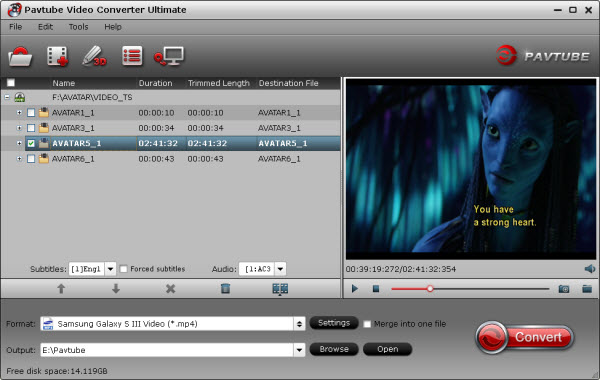
As the best Android video converter and video editor tool, Pavtube Video Converter Ultimate walks users through SD/HD video converting, Blu-ray/DVD movie ripping and ISO/IFO image file converter.
This app offers an easy way to convert virtually all video and audio types, camcorder HD footages and TiVo recordings to desired video/audio format for portable multimedia devices, HD media players or video editing software, such as:
Devices: Galaxy Tab Pro, Galaxy Bote Pro, Sony Xperia Z2, Kindle Fire HDX, Galaxy Tab 3, Galaxy Note 3, Galaxy S4, Galaxy Note 10.1 2014 Edition, Google new Nexus 7, Nexus 10, Kindle Fire HD, Moto X, Sony Xperia Z1, iPad Air, iPhone 5S, iPhone 5C, iPad Mini 2, Surface RT/Pro, Surface 2, Toshiba Encore, HTC One Mini, Asus Fonepad 7, MeMO Pad HD 7, MeMO Pad Smart 10, Transformer Prime, Infinity TF700, Nook HD+, Nabi 2, SkyPad tablets, HP TouchPad, etc.
Players: Apple TV 3, WD TV, PS3, Xbox 360, Popcorn Hour, Xtreamer Ultra, Dune HD Base 3D, Iomega ScreenPlay MX HD Media Player, NETGEAR NeoTV Max Streaming Player(NTV300SL), Asus O!Play Mini Plus, etc.
Video Editing Softwares: Avid Media Composer, Avid Xpress Pro, Adobe Premiere, Creative Suite 6, After Effects CS6, Sony Vegas, Sony Vegas Pro 12, Sony Movie Studio Platinum 12, Pinnacle Studio, CyberLink PowerDirector, Windows Movie Maker, DaVinci Resolve, MAGIX Movie Edit Pro HD, Corel VideoStudio Pro, etc.
Plus, you are allowed to freely customize and personalize the conversion files through its settings and options in order to get an individual output in your own way.
Not all video tools like Pavtube Video Converter Ultimate offer so many video/movie/image file convertung abd editing options in this full-features and powerful video converter.
- Support nearly all HD/SD video and audio formats to various video and audio format;
- Make videos & movies & audios compatible with Android tablets/Phones, Apple devices, Windows 8.1/8, video game console, websites and more;
- Save a 100% intact BD M2TS/DVD VOB movie without extras;
- Full disc copy with original BD/DVD structure;
- Convert Blu-ray/DVD films to almost all video/audio formats;
- Edit videos with trim, crop, split, merge and special effects;
- Process videos and movies in batch even faster and easier;
- Attach external *.srt, *.ass, or *.ssa subtitles into source media for entertainment;
- Support perfect audio and video synchronization.
The conversion speed is very fast because it supports batch conversion and NVIDIA CUDA & ATI Stream (AMD APP) acceleration technologies. It converts multiple video clips at the same time, moreover it can shut down computer after the process is complete, so run the app overnight and you could enjoy the created videos next morning when you are up.
Mac Version: iMedia Converter for Mac
Free Download:

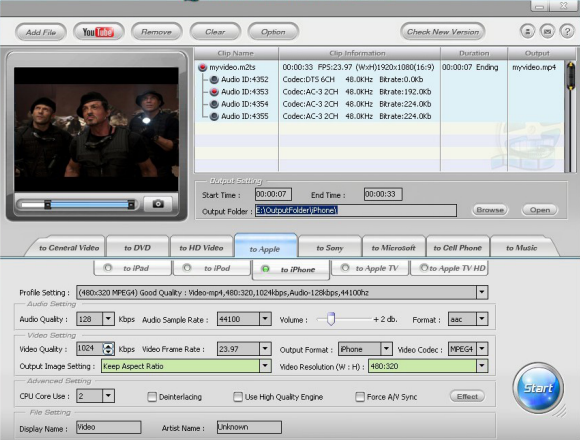
 Top 2. WinX Video Converter
Price: Free
Top 2. WinX Video Converter
Price: Free
The free WinX Video Converter can only convert AVI, DivX, Xvid, ASF, FLV, MPEG1/2, MOV, VOB, WMV to AVI, FLV, MP4, MPEG1/2, MOV, WMV in the format accepted by Android phones and tabs.
This free video converter software is also built in intuitive and practical features to trim video clips, customize video audio parameters, extract audio to MP3, grab video images to BMP, JPEG. Inside with High Quality Engine, WinX Video Converter offers excellent video and audio quality with fast speed.
No Mac version.
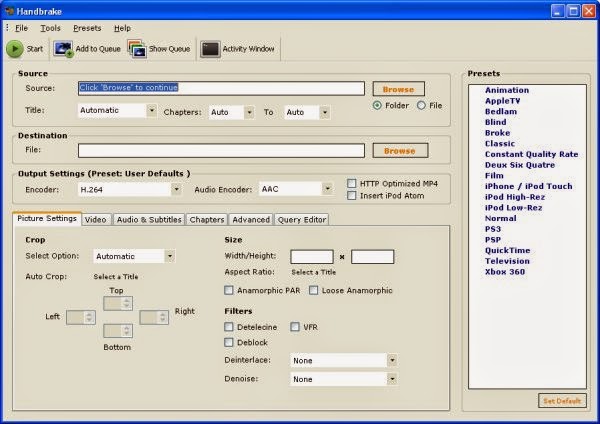
Top 3. Handbrake
Price: Free
HandBrake is an open-source, GPL-licensed, multiplatform, multithreaded video transcoder.
Handbrake can process most common multimeida files and any DVD or Bluray sources that do not contain any kind of copy protection.
Outputs:
- File Containers: MP4(M4V) and MKV
- Video Encoders: H.264(x264), MPEG-4 and MPEG-2 (libav), or Theora(libtheora)
- Audio Encoders: AAC, CoreAudio AAC/HE-AAC (OS X Only), MP3, Flac, AC3, or Vorbis.
- Audio Passthru: AC-3, DTS, DTS-HD, AAC and MP3 tracks
Misc features:
- Title / Chapter selection
- Queue up multiple encodes
- Chapter Markers
- Subtitles (VobSub, Closed Captions CEA-608, SSA, SRT)
- Constant Quality or Average Bitrate Video Encoding
- Support for VFR, CFR and VFR
- Video Filters: Deinterlacing, Decomb, Detelecine, Deblock, Grayscale, Cropping and scaling
- Live Video Preivew
- Built-in presets for common devices
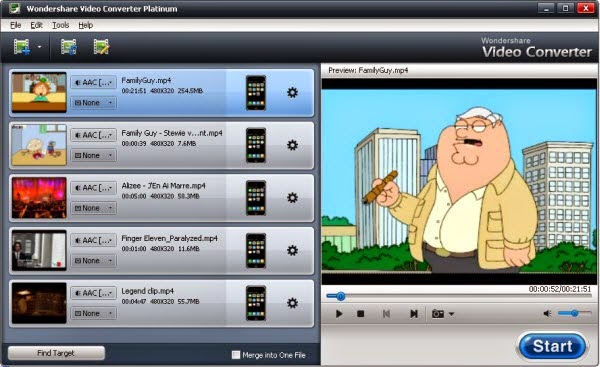
Top 4. Wondershare Video Converter Platinum
Price: $39.95
Wondershare Video Converter Platinum can directly convert videos among all popular formats, including HD and AVCHD videos. It supports you to play your favorite movies on all popular portable devices after video conversion. It's an easy, fast and reliable video converter to convert various different videos and audios so as to enjoy them anywhere and anytime as you like.
- Convert video and audio to almost all popular formats
- Support converting HD and camera AVCHD videos, including converting to 1080p video for new iPad
- Well support TiVo files recorded by TiVo? DVRs
- Extract audio from videos as M4A, WMA, WAV, MP3, AAC, etc.
- Make videos compatible with Apple devices, Windows Phone 7, Android phones, video game console and more
Top 5.
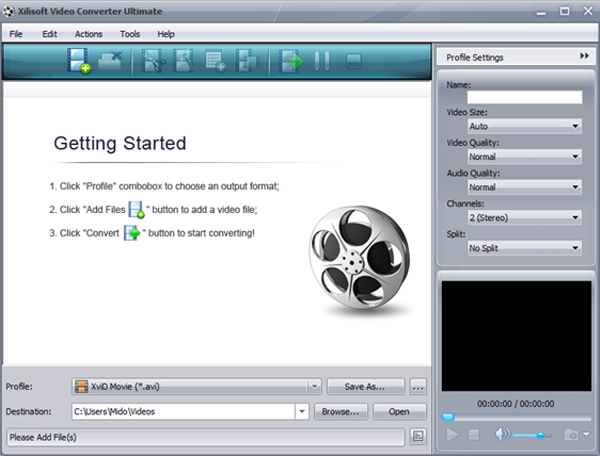
Xilisoft Video Converter
Price: $39.95
Xilisoft Video Converter is easy, fast, reliable, and loaded with features. Besides capable of converting standard videos of all popular formats, it also supports the conversion from standard videos to 3D videos as well as the mode conversion among 3D videos. Now you can convert video, audio, and animated images to play on your PSP, PS3, iPod, iPhone, Apple TV, Xbox, Google phones, iPad, iPad2 and other digital multimedia devices. All is made possible with Xilisoft Video Converter.
- Convert nearly all HD/SD video and audio formats
- Support videos shot by iPhone, other smart phones and DVs
- Convert video to iPad, iPod, iPhone, PSP, PS3, Xbox, mobile phone, MP4 players, Google phones
- Edit videos, clip/merge/split files, add watermarks/subtitles/soundtracks
Mac Version: Video Converter for Mac
Summary: Ultimately, the very best way to enjoy your favorite videos and Blu-ray/DVD movies on the go would be to utilize the Pavtube Android Video Converter Ultimate (now is 30% off), which gives you all of the options necessary with no restrictions, affordable, convert videos/blu-ray/dvd/iso/ifo with a highest speed, perfect audio and video synchronization, support adding srt/ass/ssa subtitles, etc. What's more, the app supports copy the entire BD/DVD disc content to computer hard drive with original structure and all audio/subtitle tracks and chapter markers preserved. Nevertheless, Handbrake is amongst the best free Android Video Converter. If you have any other suggestions, welcome your comments and feedback.
Learn more reviews:
Surprising!!! 30% OFF(Save $20) Special Offer for 2013 Mother's Day From Pavtube.com
2013 Mother's Day is coming soon! If your mom like watching 1080p Blu-ray movies, DVD movies or all kinds of videos (such as: MKV, AVI, TV Shows, WMV, Flash videos, etc.) on her Tablet or Phone? Do you think what is most appropriate gift? Guessed it! A Blu-ray Ripper, DVD Ripper tool or a Video Converter Ultimate and a iMedia Converter for Mac is Best Gifts for Mother's Day 2013 for your mom. These Video/Movie Converters can help your mom to convert Blu-ray/DVD collections, MKV, AVI, VOB, Tivo, Flash Videos etc. to her tablet or phone support playback formats for watching anytime and anywhere.
From May 8 to May 22, 2013. Pavtube FaceBook put into effect a Special Offer as the 2013 Mother's Day Special Gifts for your Mom, Up to 30% discount has arrived! We offer a 30% discount coupon in return! Click "2013 Mother's Day Coupon Code", you will get the most useful and powerful Video Movie Converter on Windows or Mac:
1. 30% OFF BDMagic for Windows or Mac (Save $16)
Useful Tips:
2. 30% OFF DVDAid for Windows or Mac (Save $10.5)
Useful Tips:
3. 30% OFF Video Converter Ultimate - Save $20
Useful Tips:
4. 30% OFF iMedia Converter for Mac - Save $20
Happy Mother's Day 2013!
Read More: